

ImportFromWeb is a Google Sheets add-on, i.e. a third-party tool or extension that enhances the functionality of Google Sheets. Like other add-ons it can be installed from the Google Workspace Marketplace and provide additional features or automate tasks that are not natively available in Google Sheets.
Install the add-on
The first step to get started is to install ImportFromWeb, from the Google Workspace Marketplace.
The Installation process takes less than a minute and will take you over a few screens. One screen might trigger your attention :
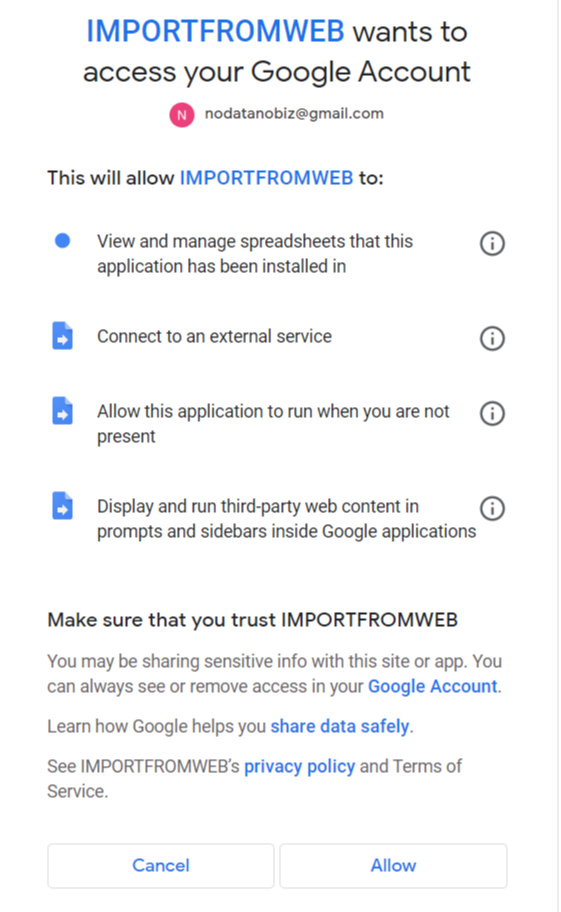
Let us walk you through the authorizations
- View and manage spreadsheets that this application has been installed in
ImportFromWeb only accesses spreadsheets where you explicitly activate it. It cannot view or edit any other files in your Google Drive.
- Connect to an external service
Most of the magic takes place on our servers as AppsScript, the default scripting service for Google Workspace, does not provide sufficient capabilities.
- Allow this application to run when you are not present
ImportFromWeb allows you to set up triggers that update your data periodically even though the spreadsheet is closed.
- View your data in Google BigQuery
ImportFromWeb may temporarily store the web data you request in a secure BigQuery table to improve caching, performance, quota reliability, and to optionally provide you with access to past extraction results.
We never store or access the rest of your spreadsheet content.
- Display and run third-party web content in prompts and sidebars inside Google applications.
We provide in-app sidebars with tips, documentation, and tools to help you use the IMPORTFROMWEB() formulas and ImportFromWeb automations more easily.
Google Workspace add-ons go through a strict evaluation from the Google team before being released to the marketplace. As a consequence, you can usually trust add-ons listed on the marketplace.
You can read more about our privacy policy here
Activate the add-on
In any spreadsheet, go to the menu Extensions > ImportFromWeb > Activate add-on. (If you don’t see ImportFromWeb in the Extensions, just reload the document)
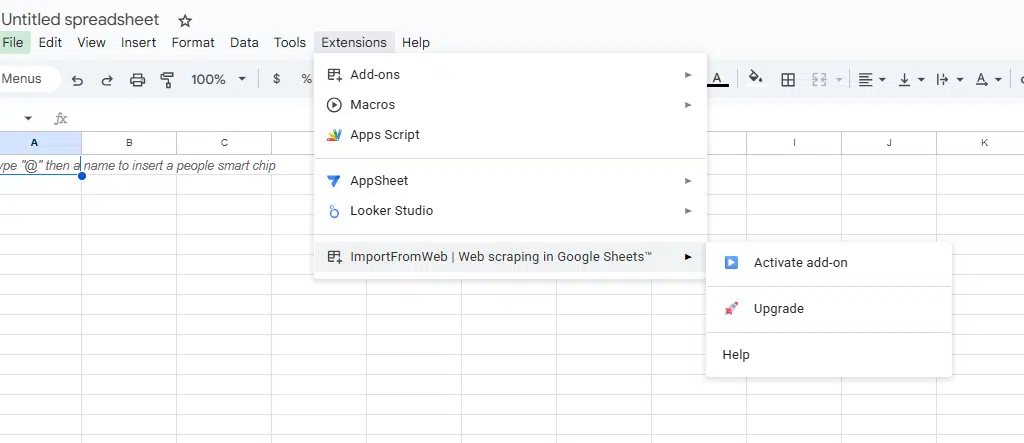
The following sidebar appears on the right of your spreadsheet, enabling you to use the =IMPORTFROMWEB() formulas.

To switch to ImportFromWeb automations, go back to the menu Extensions > ImportFromWeb and select the option in the menu:

A new sidebar opens giving you access to ImportFromWeb automations

In some cases, Google sheets may have troubles activating the add-on. It usually happens when you use several Google accounts within the same Chrome session. To troubleshoot this, follow our guidelines here.
Please note that the add-on is designed for use on a desktop or laptop computer, not on smartphones. We also strongly recommend using the Google Chrome browser while using the add-on.