Amapulse sidebars
Once you’ve activated Amapulse (formerly ImportFromWeb) in a Google Sheets file, you’ll notice that a sidebar opens on the right part of your spreadsheet.
What’s a sidebar?
A sidebar is a panel that appears on the right-hand side of your Google Sheets interface. Google Sheets add-ons use sidebars to give users an easy, intuitive way to interact with features. Sidebars are especially useful for guiding workflows, managing settings, and launching actions with just a few clicks.
The Amapulse sidebars
Amapulse comes with 2 sidebars, depending on the solution you’re using, i.e. the =AMAPULSE() formula or Amapulse Automations. Each of them can be open from the spreadsheet menu in Extensions > Amapulse – formerly ImportFromWeb.
=AMAPULSE() formula sidebar
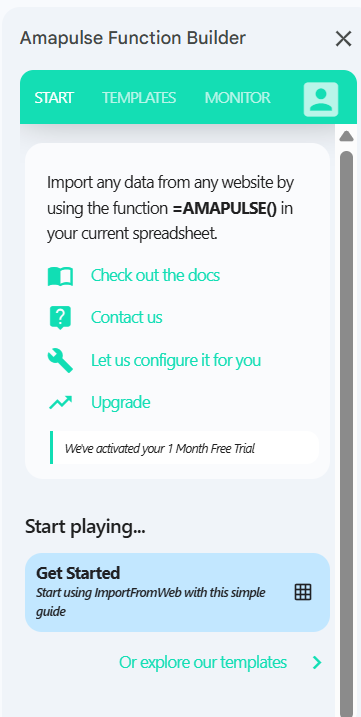
Your control panel for using Amapulse with 4 main tabs:
- START: Access docs, support, and a starter template
- TEMPLATES: Use pre-set configs for sites like Amazon, Google, LinkedIn, and more
- MONITOR: Refresh functions, view metadata, and check for errors
- ACCOUNT: Track usage and manage your subscription
Find all the details about the =AMAPULSE() formula sidebar in our guide: Use the =AMAPULSE() sidebar.
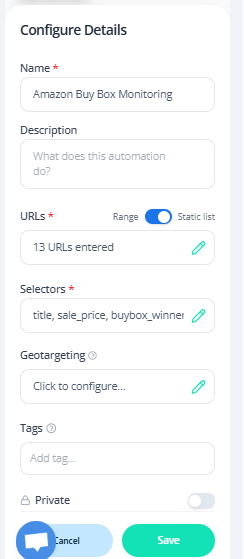
Amapulse Automations sidebar
This sidebar is your control center for more advanced scraping tasks. It lets you:
- Create and execute your scraping automations
- Schedule recurring extractions
- Access stored (historical) data
- Set zip code tracking
- Track usage and manage your subscription